How to change a YouTube channel name
Introduction
Your YouTube channel name plays an important role in how viewers recognize your brand and remember your content. Whether you are starting a new direction, updating your personal brand, or changing your content niche, knowing how to change your YouTube channel name can help you keep your channel identity fresh and relevant. The process is simple and does not require creating a new channel or losing your existing videos, subscribers, or engagement.
A well-chosen channel name can improve your overall branding and make it easier for people to connect with your content. In this guide, you will learn the exact steps to change your YouTube channel name on desktop and mobile, along with useful tips to choose a name that supports long-term growth.
Understanding YouTube Channel Name Changes
Changing your YouTube channel name is a simple update that modifies how your channel appears to viewers. Your new name will replace the previous one across your channel page, search results, comments, and other visible areas connected to your account.
This change is mainly related to your channel identity and does not remove your uploaded videos, playlists, subscribers, or watch history. However, if your audience already knows your old name, a sudden change may require some communication to avoid confusion.
Before making the update, consider whether the new name matches your content style and future goals. A strong channel name should be easy to remember, relevant to your niche, and flexible enough to grow with your brand.
What Happens When You Change Your YouTube Channel Name?
When you update your YouTube channel name, the new name becomes visible throughout your channel profile. Viewers will see the updated name on your videos, channel page, and interactions such as comments.
Your channel’s content remains unchanged. Your uploaded videos, subscribers, monetization status, and analytics data stay connected to the same account. The main difference is how your brand appears publicly.
Keep in mind that search engines and returning viewers may need some time to recognize the new identity. Updating your channel description, banner, and social media profiles can help create a smoother transition.
Things to Consider Before Changing Your Channel Name
Before selecting a new name, think about how it represents your content and audience. A rushed name change can make branding more difficult later.
Consider these points:
- Choose a name that matches your current or future content.
- Avoid names that are difficult to spell or remember.
- Check if the name is available on other social platforms.
- Make sure it reflects a professional and trustworthy image.
A thoughtful name choice helps build stronger recognition and avoids the need for frequent changes.
How to Change YouTube Channel Name on Desktop
Changing your YouTube channel name from a computer is usually the easiest option because YouTube Studio provides full access to channel customization settings. The process only takes a few minutes and can be completed from your browser.
You can update your name through the customization section without affecting your channel content. Make sure you are signed in to the correct Google account connected to your YouTube channel before starting.
Following the correct steps ensures your new channel name is saved properly and displayed across your profile.
Open YouTube Studio Settings
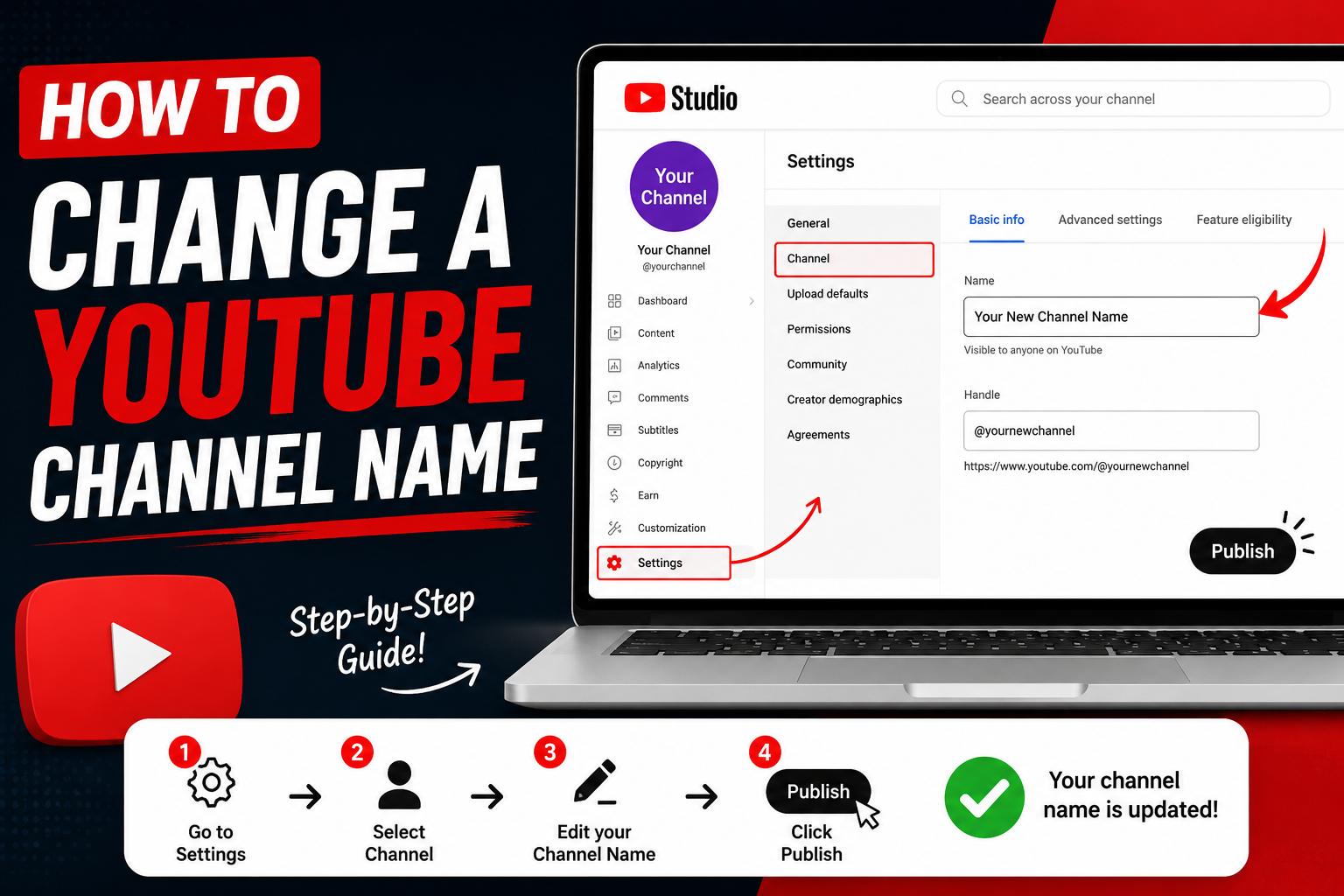
Start by opening YouTube and signing into your account. Click your profile picture in the top-right corner and select YouTube Studio.
Inside YouTube Studio, look for the customization option in the left-side menu. This area allows creators to manage their channel appearance, branding, and basic information.
The customization section is where you can edit important details such as your channel name, description, profile image, and banner.
Edit Your Channel Name
After opening the customization page, select the Basic Info tab. Here you will find your current channel name along with other profile details.
Click the edit icon next to your channel name and enter your new preferred name. Review the spelling carefully before saving because this is the name viewers will see.
Once you click publish or save changes, YouTube will update your channel information. The update may appear immediately or take a short time to display everywhere.
How to Change YouTube Channel Name on Mobile
Many creators manage their channels directly from their phones, and YouTube makes it possible to change your channel name using mobile apps. The steps are slightly different from desktop but are still quick and straightforward.
Using the mobile method is helpful when you need to update your branding while away from your computer. Make sure your YouTube app is updated to access the latest settings options.
Changing Your Channel Name Using the YouTube App
Open the YouTube app and tap your profile picture. Select “View Your Channel” to access your channel page.
Tap the edit option or pencil icon, then choose the section where your channel information appears. You can update your channel name and save the changes from there.
After saving, your new name will replace the old one. It may take a little time before every part of YouTube reflects the update.
Changing Name Through YouTube Studio Mobile App
The YouTube Studio mobile app provides another way to manage your channel details. Open the app, select your profile, and access channel editing options.
This method is especially useful for creators who regularly manage videos, comments, and analytics from their phones. The Studio app keeps most creator tools organized in one place.
After editing your name, save the changes and check your channel page to confirm the update.
Best Practices for Choosing a New YouTube Channel Name
A good YouTube channel name is more than just a label. It represents your content, personality, and the experience viewers can expect from your channel.
Before finalizing a new name, think about long-term branding. A name that works today should also make sense if your channel grows or expands into new topics.
Keep Your Name Short and Memorable
Short names are usually easier for viewers to remember and search. Avoid using complicated spellings, unnecessary numbers, or long phrases that are difficult to recall.
A simple name creates stronger recognition and makes it easier for people to recommend your channel to others.
Match Your Channel Name With Your Content
Your channel name should give viewers an idea of what your content is about. For example, a gaming channel, educational channel, or personal brand should have a name that fits its purpose.
A clear connection between your name and content helps attract the right audience and creates a stronger brand identity.
Use SEO-Friendly Naming Strategies
A search-friendly channel name can support discoverability, but it should still sound natural. Avoid stuffing multiple keywords into your name because it can appear unprofessional.
Instead, focus on creating a unique identity that includes relevant ideas connected to your niche. Strong branding combined with quality content has a bigger impact on growth.
Common Problems When Changing a YouTube Channel Name
Although changing your YouTube channel name is simple, some creators may experience small issues during the process. Understanding common problems can help you fix them quickly.
Most issues are related to account settings, update delays, or YouTube guidelines. Checking your account information and waiting for changes to process usually resolves many problems.
Name Change Not Showing Immediately
Sometimes your updated channel name may not appear instantly across all areas of YouTube. This can happen because different parts of the platform update at different speeds.
Try refreshing your channel page, signing out and back in, or checking again later. If the problem continues, review your account settings to make sure the change was saved successfully.
YouTube Name Change Restrictions
YouTube allows creators to update their channel names, but the platform has rules to prevent misleading or inappropriate names.
A name may be rejected if it violates community guidelines, impersonates another brand, or contains restricted content. Choosing an original and suitable name reduces the chances of approval issues.
Does Changing Your YouTube Channel Name Affect SEO?
Many creators worry that changing their channel name will hurt their search rankings. A name change alone does not remove your videos or erase your channel history, but branding consistency still matters.
Your content quality, viewer engagement, and optimization have a much larger impact on YouTube performance.
Impact on Search Rankings
Your channel name can influence recognition, but your video titles, descriptions, watch time, and audience engagement are major ranking factors.
If you change your name, continue creating valuable content and keep your branding consistent. Over time, viewers and search systems can adjust to the new identity.
Maintaining Audience Trust After Rebranding
If you already have subscribers, let them know about your new channel name. A short announcement in a video, community post, or description update can make the transition easier.
Updating your profile picture, banner, and channel description alongside the name change creates a complete and professional rebrand.
How Often Can You Change a YouTube Channel Name?
YouTube allows creators to change their channel name, but making frequent changes is not recommended. Constantly changing your identity can confuse viewers and weaken brand recognition.
Choose a name that you can confidently use for the long term. If you are planning a major content shift, take time to consider how the new name fits your future goals.
FAQs About Changing YouTube Channel Name
Can I change my YouTube channel name without losing subscribers?
Yes, changing your channel name does not remove your subscribers, videos, or channel data. Your account remains the same.
How long does it take for a YouTube channel name to update?
Most changes appear quickly, but some updates may take a little time to display across the platform.
Can I use the same name as another YouTube channel?
You can choose a similar name, but creating a unique name is better for branding and avoiding confusion.
Will changing my YouTube name affect my videos?
No, your uploaded videos and playlists remain unchanged after updating your channel name.
Can I change my YouTube channel name from my phone?
Yes, you can change your channel name using the YouTube app or YouTube Studio mobile app.
Conclusion
Changing your YouTube channel name is a simple way to refresh your brand and create a stronger connection with your audience. Whether you are rebranding, changing your niche, or improving your channel identity, the update process only takes a few steps.
Before making the change, choose a name that is memorable, relevant, and suitable for long-term growth. After updating your name, keep your branding consistent across your channel and other online platforms. A strong identity combined with valuable content can help your YouTube channel continue growing.
If you’re changing your YouTube channel name as part of a personal update, you may also find our guide on how to change your name after marriage helpful for keeping your online identity consistent. For more naming tips, ideas, and useful resources, visit NameSideaz and explore guides designed to help you choose the right name. Looking for a creative name for your gaming group, team, or community? Our Team Name Generator can help you discover unique and memorable options. These resources make it easier to manage your online presence and find names that match your brand, personality, or purpose.