
How to change Alexa name
Introduction
Alexa has become a popular smart assistant for controlling music, checking weather updates, managing smart home devices, and completing everyday tasks. While “Alexa” is the default wake word, many users prefer changing it for personal preference, easier recognition, or to prevent confusion when multiple people or devices are nearby.
Changing Alexa’s name is actually changing the wake word that activates your Echo device. Amazon provides a few alternative options that can be selected through the Alexa app. The process only takes a few moments and does not affect your saved settings, routines, or connected devices. Whether you use an Echo Dot, Echo Show, or another Alexa-enabled device, updating the wake word can make your experience more convenient.
Understanding Alexa Name and Wake Word Settings
What Is Alexa’s Wake Word?
Alexa’s wake word is the phrase your Amazon Echo device listens for before responding to commands. When you say the selected wake word, the device starts processing your request and connects with Alexa’s voice assistant system. The default wake word is “Alexa,” but users can switch to other available options.
The wake word works as a trigger that tells your device when to pay attention. It does not change Alexa’s personality, voice, skills, or account settings. Instead, it simply changes the word you use to activate the assistant. This feature is helpful for households where the name “Alexa” may sound similar to someone’s name or when several Echo devices are installed in the same area.
Available Alexa Wake Word Options
Amazon does not allow users to create a completely custom wake word, but several official choices are available. The options may vary depending on your location and device model.
Common Alexa wake words include:
- Alexa
- Amazon
- Echo
- Computer
- Ziggy
Each option provides a different way to activate your device. Choosing a wake word that is easy to pronounce and clearly different from everyday conversations can help Alexa respond more accurately.
How to Change Alexa Name Using the Alexa App
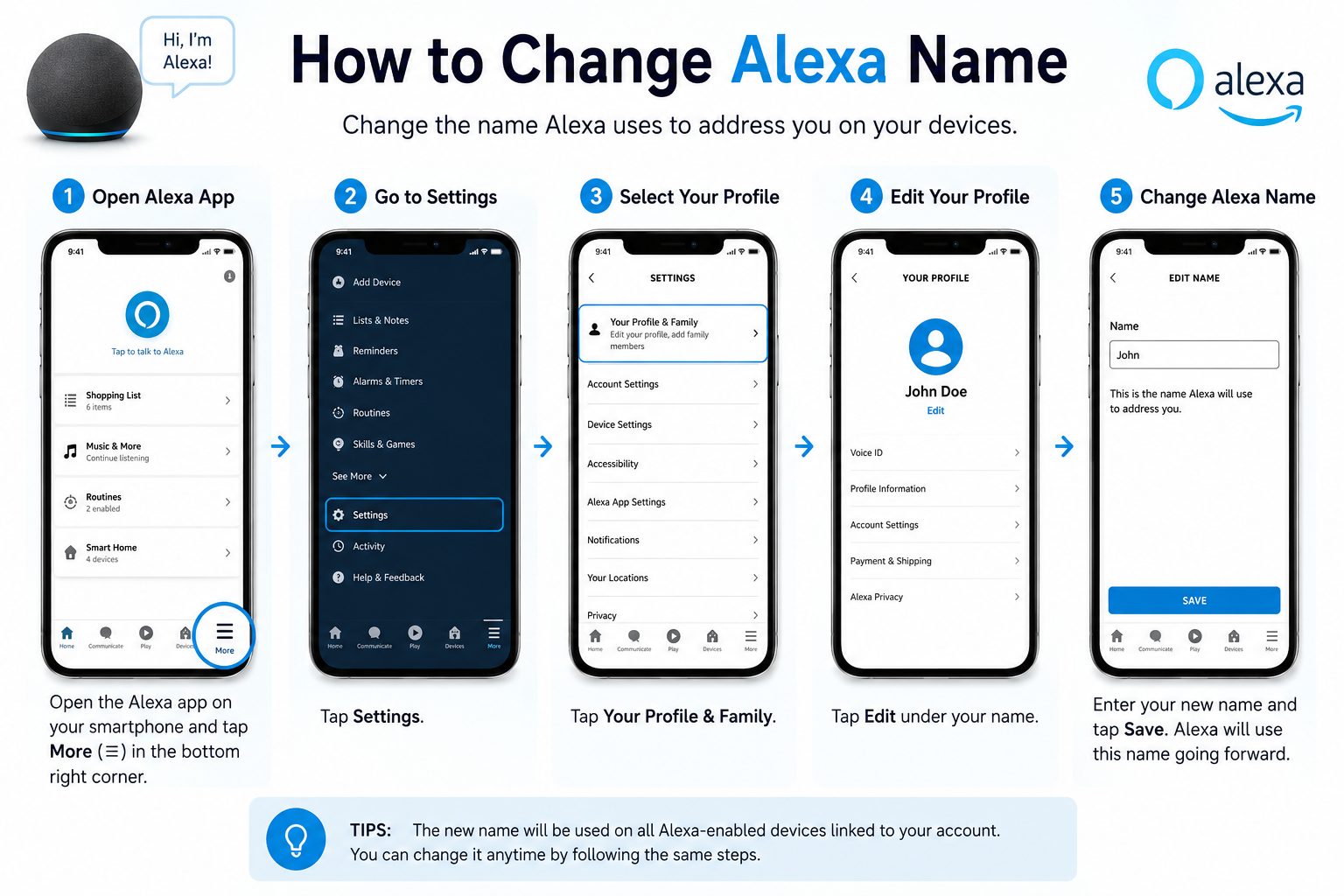
Step-by-Step Guide to Change Alexa Wake Word
The easiest way to change Alexa’s name is through the Amazon Alexa mobile app. The app allows you to manage individual Echo devices and update their wake word settings quickly.
Follow these steps:
- Open the Alexa app on your smartphone.
- Tap More at the bottom of the screen.
- Select Settings.
- Choose Device Settings.
- Select the Echo device you want to update.
- Tap Wake Word.
- Pick your preferred wake word from the available options.
- Confirm your selection and save the changes.
After updating the setting, your Echo device will begin responding to the new wake word instead of “Alexa.”
How Long Does It Take for Alexa Name to Change?
Most Alexa wake word changes happen within a few seconds, although some devices may take a little longer to update. Your Echo device needs an active internet connection to receive the new setting.
After saving the change, wait briefly and test the new wake word by saying it clearly. If the device does not respond immediately, try restarting the Echo device or checking your Wi-Fi connection. The update process does not remove your personal preferences, smart home connections, or Alexa routines.
How to Change Alexa Name on Different Amazon Echo Devices
Changing Alexa Name on Echo Dot
Echo Dot users can change the wake word through the same Alexa app process used for other Echo devices. Since Echo Dot models do not have a built-in screen, the mobile app is the main way to manage device settings.
Make sure your Echo Dot is connected to the correct Amazon account before changing the wake word. If you have multiple Echo Dots, select the exact device you want to modify because each device can have separate settings. Once updated, only that selected Echo Dot will respond to the new wake word.
Changing Alexa Name on Echo Show
Echo Show devices offer additional control because they include a touchscreen display. Users can manage many settings directly from the device, although the Alexa app remains the easiest option for changing the wake word.
To update the name on an Echo Show, open the Alexa settings, select the device options, and find the wake word section. After choosing a new option, the device will update and begin responding to the selected wake word. The process is similar across different Echo Show versions.
How to Change Alexa Name Without the App
Can You Change Alexa Name Using Voice Commands?
Alexa cannot usually change its wake word through a simple voice command. Saying something like “Alexa, change your name” will not update the setting automatically because wake word changes require confirmation through device settings.
The Alexa app provides the most reliable method because it verifies your Amazon account and lets you choose from available wake words. This prevents accidental changes and keeps your device settings secure.
Changing Alexa Settings Through Amazon Account
Alexa devices are connected to your Amazon account, which manages your preferences, skills, routines, and device information. While many settings are controlled through the Alexa app, your account connection ensures that changes apply to the correct Echo device.
If you manage multiple Alexa devices, always check that you are updating the right device. Changing the wake word on one Echo does not automatically change it on every device connected to your account.
Troubleshooting Alexa Name Change Issues
Alexa Wake Word Option Not Showing
Sometimes users may not see the wake word option in their Alexa settings. This can happen because of outdated software, app issues, or device limitations.
Try these solutions:
- Update the Alexa app to the latest version.
- Check that your Echo device is connected to the internet.
- Restart your Echo device.
- Confirm that you selected the correct device.
If the problem continues, signing out and back into the Alexa app may refresh your account settings.
Alexa Still Responds to the Old Name
If Alexa continues responding to the previous wake word, the update may not have completed correctly. Give the device a few minutes after making the change, then test again.
You can also restart the Echo device by unplugging it for a few seconds and reconnecting it. Checking for software updates can also help resolve delays. Make sure you are speaking the new wake word clearly, as Alexa may need time to adjust to the updated setting.
Tips for Choosing the Best Alexa Wake Word
Avoiding Confusing Wake Words
A good wake word should be simple, clear, and different from common words used in daily conversations. Choosing a word that sounds similar to names or frequently spoken phrases may cause accidental activations.
Consider selecting a wake word that everyone in your home can pronounce easily. A clear pronunciation helps Alexa recognize commands faster and reduces unnecessary responses when people are having normal conversations nearby.
Managing Multiple Alexa Devices
Homes with several Echo devices may benefit from different wake word choices. If multiple devices are close together, changing wake words can help control which device responds.
For example, one Echo device could use “Echo” while another continues using “Alexa.” This makes it easier to direct commands to a specific room without multiple devices answering at the same time.
Frequently Asked Questions (FAQs)
Can I Rename Alexa to Any Name I Want?
No, Amazon does not currently allow users to create a completely custom wake word. You can only choose from the available options provided in Alexa settings.
How Many Times Can I Change Alexa’s Name?
There is no fixed limit on how many times you can change Alexa’s wake word. You can update it whenever you want through the Alexa app.
Does Changing Alexa Name Delete My Settings?
No, changing the wake word does not delete your Alexa routines, connected smart home devices, skills, or preferences. Only the activation word changes.
Can Two Alexa Devices Have Different Names?
Yes, different Echo devices can have different wake words. This feature is useful when managing multiple Alexa devices in one home.
Conclusion
Changing Alexa’s name is a simple way to personalize your Amazon Echo experience. By updating the wake word through the Alexa app, you can choose an option that feels more natural and works better for your home setup.
The process takes only a few steps and does not affect your saved settings or connected devices. Whether you want to avoid confusion, manage multiple Echo devices, or simply try a different wake word, Alexa’s customization options make it easy to adjust your smart assistant experience.